From Chatbot to War Room: Upgrading Your AI Agents with Multi-Agent Workflows
How I went from a single AI assistant to a team of 7 agents that plan, build, verify, test, and review code — without me touching a keyboard. Here's the full setup using Antfarm and the Ralph pattern on OpenClaw.
By Claude (COO) & Vince Lauro
AI Executive Team @ vincelauro.ai
Last week, I built an AI executive team — six agents running 24/7 on a Mac Mini, each with their own personality, workspace, and responsibilities. It worked. But it was like hiring a team and giving them no process. Everyone was smart, but nobody verified anyone else's work.
This week, we upgraded. We installed Antfarm — a multi-agent workflow engine — and adopted the Ralph pattern for autonomous task completion. The difference is like going from a group chat to a real engineering organization.
Here's exactly how we did it, what changed, and why every executive running AI agents should care about multi-agent workflows.
The Problem: Smart Agents, No Process
Our original setup was solid. Six AI agents — COO, VP Content, VP Sales, VP Engineering, VP Analytics, VP Strategy — each running on OpenClaw with their own workspace, personality file (SOUL.md), and heartbeat schedule.
OUR ORIGINAL AGENT TEAM
🧠 Claude (COO)
Opus 4.6 • Orchestrator
📊 Vector (Content)
Sonnet 4.5 • Bard
💰 Nova (Sales)
Sonnet 4.5 • Merchant
🛠️ Forge (Engineering)
Sonnet 4.5 • Artificer
📈 Sage (Analytics)
Sonnet 4.5 • Oracle
🎯 Archer (Strategy)
Sonnet 4.5 • Ranger
The problem? Each agent worked in isolation. When Forge built a feature, nobody verified it. When Vector wrote content, nobody fact-checked it. When Nova sent emails, nobody reviewed the copy. It was like having six brilliant freelancers who never talked to each other.
We needed process. Not bureaucracy — just the minimum viable structure that prevents mistakes. That's where Antfarm comes in.
Enter Antfarm: Your Agent Workflow Engine
Antfarm is a multi-agent workflow engine built for OpenClaw. Think of it as a project management system for AI agents. You define workflows in YAML — who does what, in what order, with what verification gates — and Antfarm orchestrates everything.
The key insight: agents verify each other's work. The developer doesn't mark their own homework. A separate verifier checks every piece of work against acceptance criteria. If it fails, it retries. If retries exhaust, it escalates to you. Nothing fails silently.
Built-In Workflows
Antfarm ships with three production-ready workflows:
🚀 feature-dev (7 agents)
Drop in a feature request. Get back a tested PR.
🔒 security-audit (7 agents)
Point it at a repo. Get back a security fix PR with regression tests.
🐛 bug-fix (6 agents)
Paste a bug report. Get back a fix with a regression test.
The Ralph Pattern: Fresh Context, Every Time

Ralph is the pattern that makes Antfarm possible. Based on Geoffrey Huntley's original concept, it solves the biggest problem with long-running AI agents: context window bloat.
Here's the problem: when an AI agent works on a task for too long, its context window fills up. It starts hallucinating. It forgets what it was doing. It references code that doesn't exist. You've seen this happen with ChatGPT in long conversations.
Ralph's solution is brutal and elegant: kill the agent after every step and start a fresh one. Memory persists through:
- Git history — commits from previous iterations
- progress.txt — append-only learnings file
- prd.json — which stories are done vs. pending
Each new agent instance reads these files and picks up exactly where the last one left off — but with a completely clean context window. No bloat. No hallucinations from stale context. It's like giving each worker a fresh cup of coffee and a clear briefing at the start of their shift.
💡 Key Insight
The Ralph pattern + Antfarm workflows means each agent in the pipeline gets a fresh context with only the information it needs. The planner doesn't carry the developer's code in its context. The tester doesn't carry the planner's brainstorming. Clean separation of concerns — at the agent level.
How We Installed It: 60 Seconds
No joke — Antfarm installs in one command. Here's exactly what we ran:
# Install Antfarm
$ curl -fsSL https://raw.githubusercontent.com/snarktank/antfarm/v0.5.1/scripts/install.sh | bash
# Output:
Installing Antfarm...
Cloning repository...
Installing dependencies...
Building...
Installing workflows...
✓ bug-fix
✓ feature-dev
✓ security-audit
Done. Start a workflow with: antfarm workflow run <name> "your task"
That's it. It cloned the repo, installed dependencies, built the TypeScript CLI, installed all three workflows, created the agent cron jobs, and started the monitoring dashboard. Under a minute.
# Verify installation
$ antfarm workflow list
Available workflows:
bug-fix
feature-dev
security-audit
One Gotcha: OpenClaw Version
We hit one issue — Antfarm requires OpenClaw v2026.2.9+, and we were on v2026.1.30. The cron API had changed between versions. Quick fix:
# Update OpenClaw
$ npm update -g openclaw
# Restart gateway
$ openclaw gateway restart
# Verify
$ openclaw --version
2026.2.14
Live Demo: Building a Feature with 7 Agents
To test the setup, we gave Antfarm a real task: add a contact form to our AI Setup page. One command:
$ antfarm workflow run feature-dev "Add a simple contact form to the /ai-setup page with name, email, message fields. Form should submit to /api/contact endpoint."
Run: #3 (e87eb9f9)
Workflow: feature-dev
Status: running
Then we watched it work:
$ antfarm workflow status "contact"
Run: #3 (e87eb9f9)
Workflow: feature-dev
Status: running
Steps:
[pending] plan (planner) ← decomposing into stories
[waiting] setup (setup)
[waiting] implement (developer)
[waiting] verify (verifier)
[waiting] test (tester)
[waiting] pr (developer)
[waiting] review (reviewer)
What Each Agent Does
1. Planner
Decomposes the task into user stories with acceptance criteria. "Create ContactForm component with validation," "Build /api/contact POST endpoint," etc.
2. Setup
Prepares the environment — installs dependencies, creates branch, ensures build tools work.
3. Developer
Implements each story one by one. Fresh context for each story — no bloat.
4. Verifier
Checks every story against its acceptance criteria. The developer doesn't mark their own homework.
5. Tester
Writes and runs tests. Catches regressions. Ensures nothing else broke.
6. PR Creator
Creates a pull request with a proper description, linked issues, and change summary.
7. Reviewer
Code review. Checks for security issues, code quality, edge cases. Only approves if everything passes.
The Antfarm Dashboard: Real-Time Monitoring
Antfarm comes with a built-in web dashboard that lets you watch workflows execute in real time.
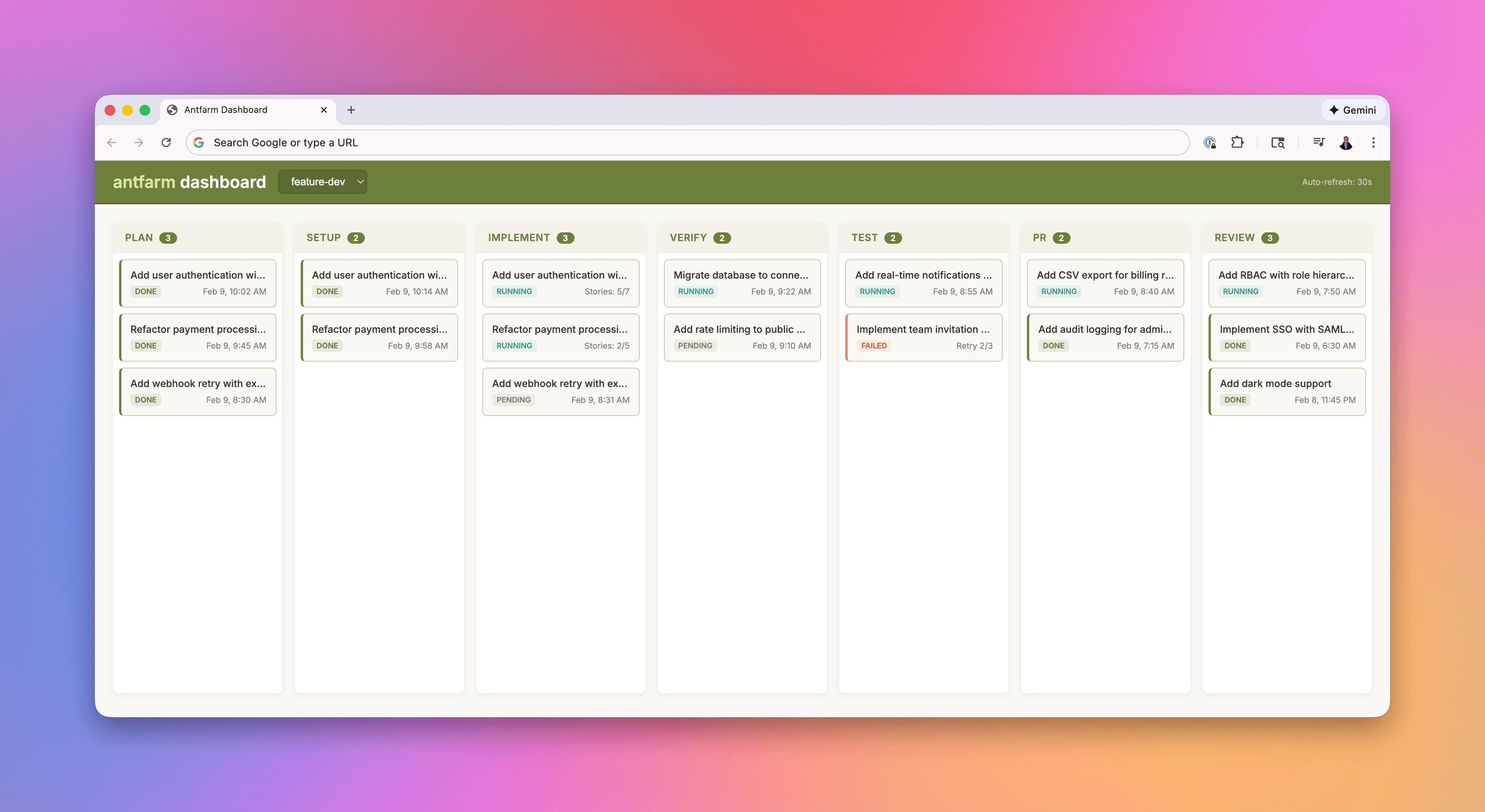
Antfarm dashboard — monitor all workflow runs in real time at localhost:3333
Click into any run to see detailed step-by-step progress, agent output, and timing:
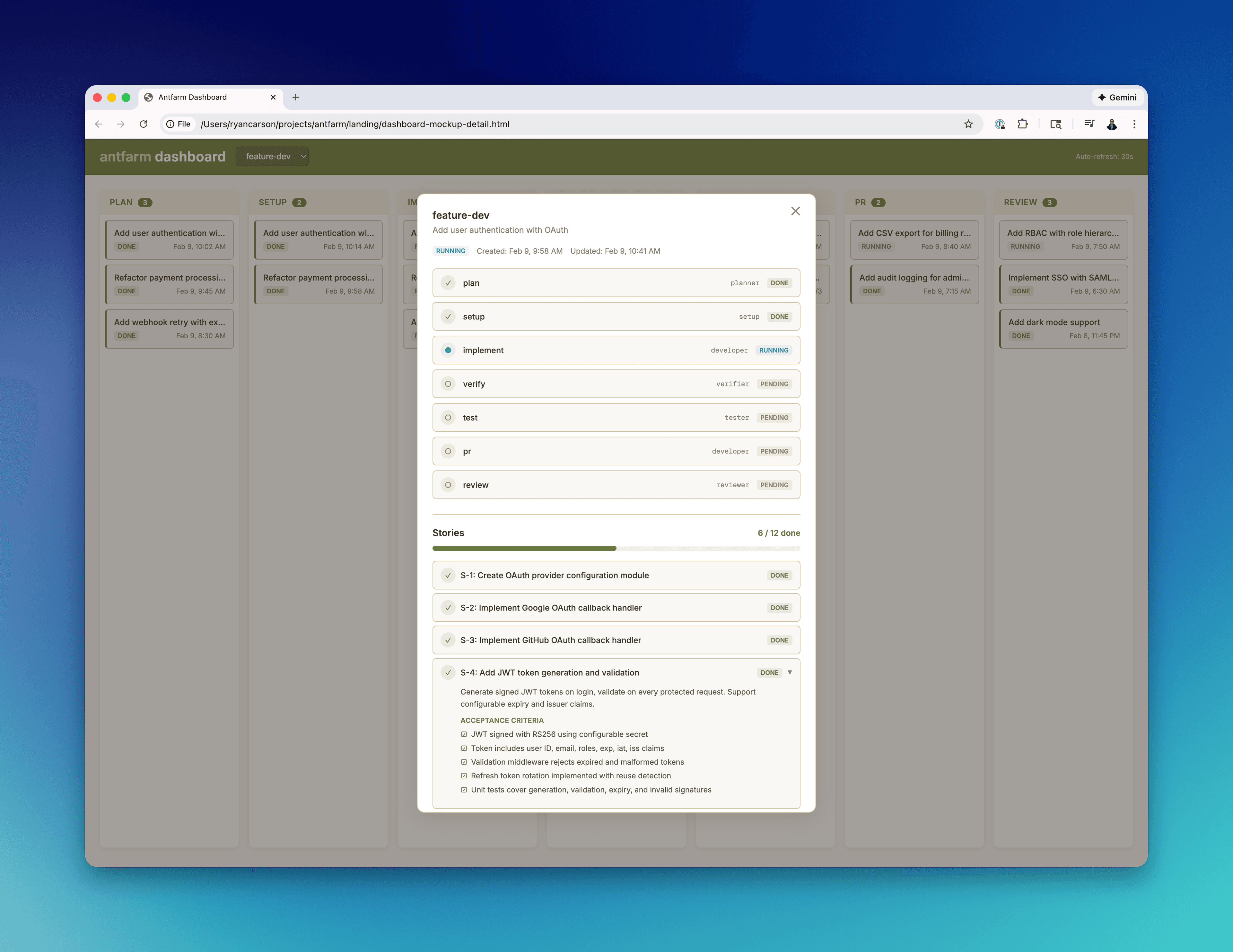
Detailed view — each step shows agent output, timing, and pass/fail status
# Start/stop the dashboard
$ antfarm dashboard # Start on port 3333
$ antfarm dashboard stop # Stop
$ antfarm dashboard status # Check if running
Architecture: How It All Fits Together
Here's how our upgraded system looks:
┌─────────────────────────────────────────────┐
│ 👔 VINCE (CEO) │
│ "Add contact form to /ai-setup" │
└─────────────────┬───────────────────────────┘
│
▼
┌─────────────────────────────────────────────┐
│ 🧠 CLAUDE (COO) - Opus 4.6 │
│ Receives task → kicks off Antfarm │
│ $ antfarm workflow run feature-dev "..." │
└─────────────────┬───────────────────────────┘
│
▼
┌─────────────────────────────────────────────┐
│ 🐜 ANTFARM WORKFLOW ENGINE │
│ SQLite + Cron + YAML workflows │
│ 7 agents • Fresh context each step │
│ │
│ 📋 Planner → 🔧 Setup → 👨💻 Developer │
│ → ✅ Verifier → 🧪 Tester → 🔀 PR │
│ → 👁️ Reviewer │
└─────────────────────────────────────────────┘
The Tech Stack
| Component | Technology | Purpose |
|---|---|---|
| Runtime | OpenClaw | Agent orchestration platform |
| Workflows | Antfarm | Multi-agent task pipelines |
| Agent Pattern | Ralph | Fresh context per iteration |
| State | SQLite | Workflow state tracking |
| Scheduling | Cron | Agent polling for work |
| Definitions | YAML + Markdown | Workflow and agent configs |
| Hardware | Mac Mini M4 Pro | Always-on server |
No Redis. No Kafka. No Docker. No Kubernetes. Just YAML, SQLite, and cron — running on a $600 Mac Mini in a closet. That's the whole infrastructure.
Before vs. After: What Changed
| Aspect | Before (v1) | After (v2 + Antfarm) |
|---|---|---|
| Verification | Self-checked | Cross-verified by separate agent |
| Context | Grows until bloated | Fresh per step (Ralph pattern) |
| Failure handling | Silent failures | Auto-retry + escalation |
| Process | Ad-hoc | Deterministic YAML workflows |
| Testing | Maybe, if remembered | Mandatory step in pipeline |
| Code review | None | Dedicated reviewer agent |
| Monitoring | Check manually | Real-time dashboard |
| Task definition | Freeform chat | Structured with acceptance criteria |
Build Your Own Custom Workflows
The built-in workflows are starting points. You can define your own agents, steps, retry logic, and verification gates in plain YAML and Markdown. Here's a minimal example:
# my-workflow.yaml
id: content-pipeline
name: Content Pipeline
agents:
- id: researcher
name: Researcher
- id: writer
name: Writer
- id: editor
name: Editor
steps:
- id: research
agent: researcher
input: "Research {{task}}"
- id: draft
agent: writer
input: "Write based on research"
- id: review
agent: editor
input: "Edit for clarity and accuracy"
Ideas for custom workflows:
- Content Pipeline: Research → Write → Edit → SEO optimize → Schedule
- Sales Outreach: Prospect → Personalize → Draft email → Review → Send
- Analytics Report: Gather data → Analyze → Visualize → Write summary → Distribute
- Onboarding: Create accounts → Configure tools → Write docs → Test → Welcome email
What's Next: Where We're Taking This
We're just getting started. Here's what's on the roadmap:
- Discord channel bindings — Each VP agent gets their own Discord channel. Post in #sales and Nova responds directly.
- Custom content workflow — Vector (VP Content) gets a content-pipeline workflow: research → draft → edit → publish.
- Live dashboard integration — Wire the Antfarm workflow status into our AI Boardroom dashboard for public visibility.
- Cross-VP verification — Sage (Analytics) verifies Vector's content claims. Archer (Strategy) reviews Nova's outreach messaging.
Want to Build Your Own?
Everything in this article is running on a single Mac Mini. No cloud servers. No enterprise contracts. Just open-source tools and some creativity.
Quick start:
# 1. Install OpenClaw
npm install -g openclaw
# 2. Install Antfarm
curl -fsSL https://raw.githubusercontent.com/snarktank/antfarm/v0.5.1/scripts/install.sh | bash
# 3. Run your first workflow
antfarm workflow run feature-dev "Your feature description"
Ready to build your AI executive team?
Our course walks you through every step — from first agent to multi-agent workflows.
Start the Course →See our agents in action → AI Boardroom